FR EN
Buy: €4.99
KeyDate
Launch offer — €4.99

KeyDate

The date in every app!
Without ever lifting your hands from the keyboard.

Live demo — and yes, that's today's actual date 😉

Finder File Edit View 8:49 PM KeyDate ⊞ 🔋 🔍 2026-03-28 — Team Meeting Aa ☰ ⊡ 2026-03-28 – Team Meeting… 8:39 PM Attendees: Sarah, Marc… Project v2.1 notes Yesterday Q2 calendar review… Q2 communications budget 03/24 Final presentation… March 28, 2026 at 8:39 PM 2026-03-28 - Team Meeting Attendees: Sarah, Marc, Julie Topics covered: • Project v2.1 progress • Q2 calendar review • Communications budget KeyDate Today Short 03/28/2026 dts Long Saturday, March 28, 2026 dtl ISO 2026-03-28 ⌃⌥⌘T Custo… 03/28/2026 dts Pick a date March 2026 < > M T W T F S S 1 9 10 2 3 4 5 6 7 11 9 10 11 12 13 14 12 16 17 18 19 20 21 13 23 24 25 26 27 28 29 14 30 31 Preferences… Quit KeyDate

You type, the date appears.

KeyDate fits seamlessly into your workflow — no window to open, no mouse to reach for.

1

Type your trigger

In any application, type your chosen abbreviation (dts by default, but you can use anything you like) followed by a space.

Meeting on dts|
2

The date is inserted

KeyDate instantly replaces the trigger with today's date in the format you've chosen.

Meeting on 03/28/2026|
3

Keep on typing

You never broke your flow. No window, no click, no copy-paste. The cursor stays exactly where it was.

Meeting on 03/28/2026 — agenda|

Three ways to insert a date.

Pick the method that fits your workflow — or use all three.

macOS keyboard

Text trigger

Choose your own abbreviations in Preferences — dts, ddd, //d, or anything you like. Avoid common words: pick a sequence you'd never type by accident.

dts → 03/28/2026
ddd → Saturday, March 28, 2026
//d  → 2026-03-28
These are example abbreviations — you choose your own.
ctrl opt D inserts the date

Global keyboard shortcut

No shortcut is forced on you. Assign whichever combination you prefer — per format, per app, however you work. Works everywhere, even where text triggers don't.

D  → 03/28/2026
L  → Saturday, March 28, 2026
Your choice — a different shortcut per format.
MARCH 2026 W. M T W T F S S W9 1 W10 2 3 4 5 6 7 8 W12 16 17 18 19 20 21 22 W13 23 24 25 26 27 28 29 W14 30 31

Mini calendar

Click the menu bar icon: the month appears with day-of-week columns and week numbers. Instant reference — click any date to insert it.

📅 Days · week numbers · today
Always at hand · past and future · one click = date inserted

Discreet, until you need it.

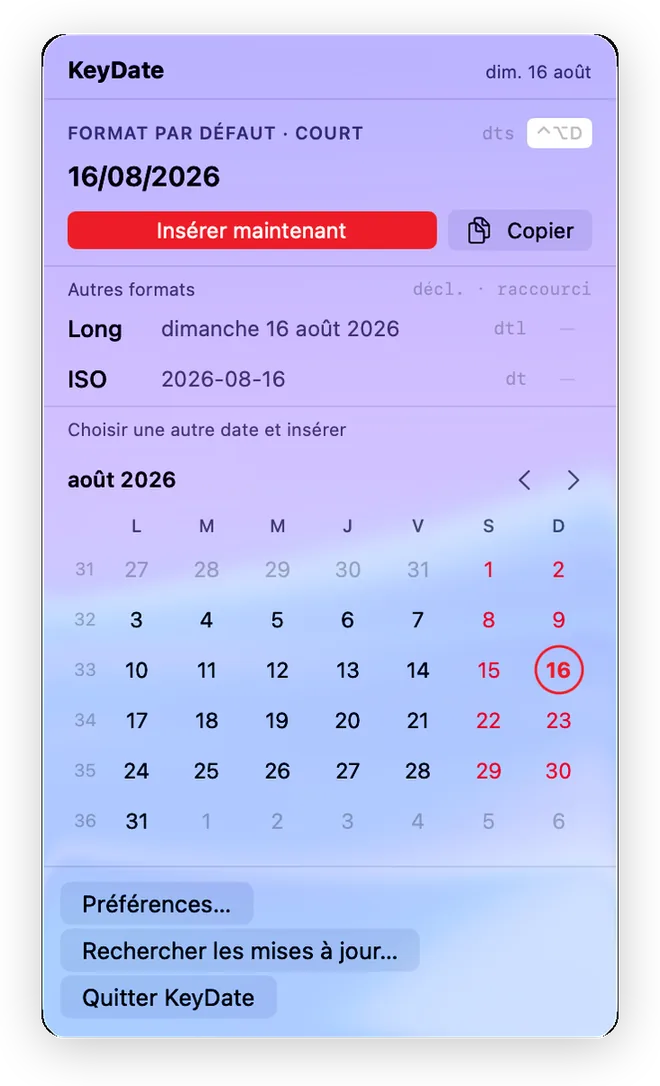
KeyDate popup in light mode: today's date, Long and ISO formats, August 2026 mini-calendar with week numbers
One click in the menu bar: today's date, your formats, the mini-calendar.
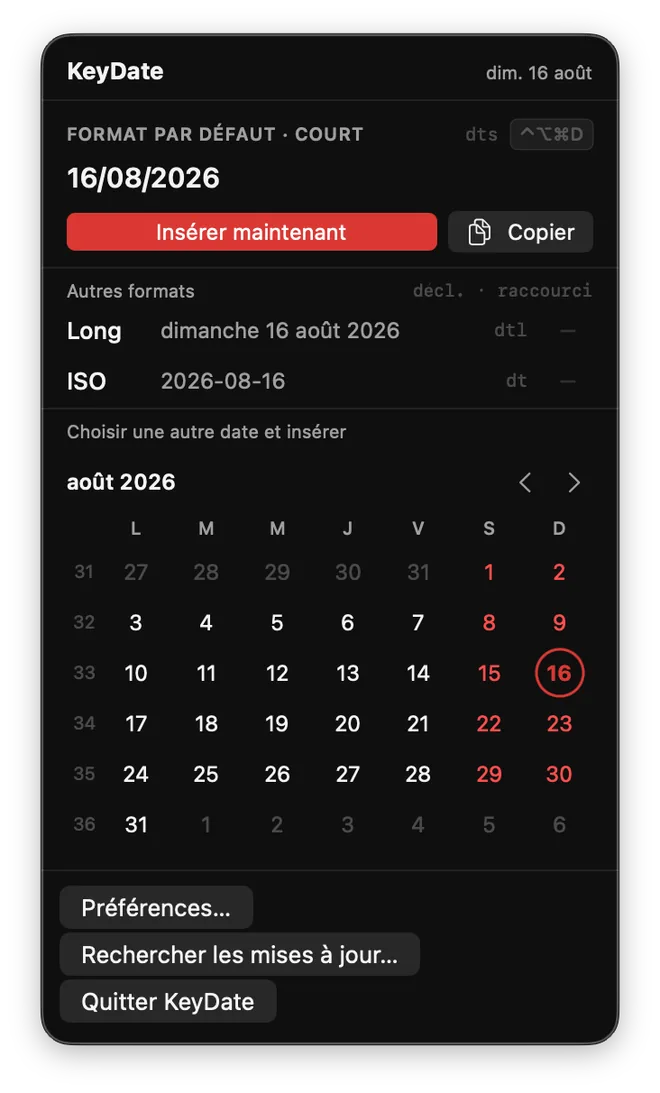
KeyDate popup in dark mode
Follows your Mac's theme — light, dark or automatic.
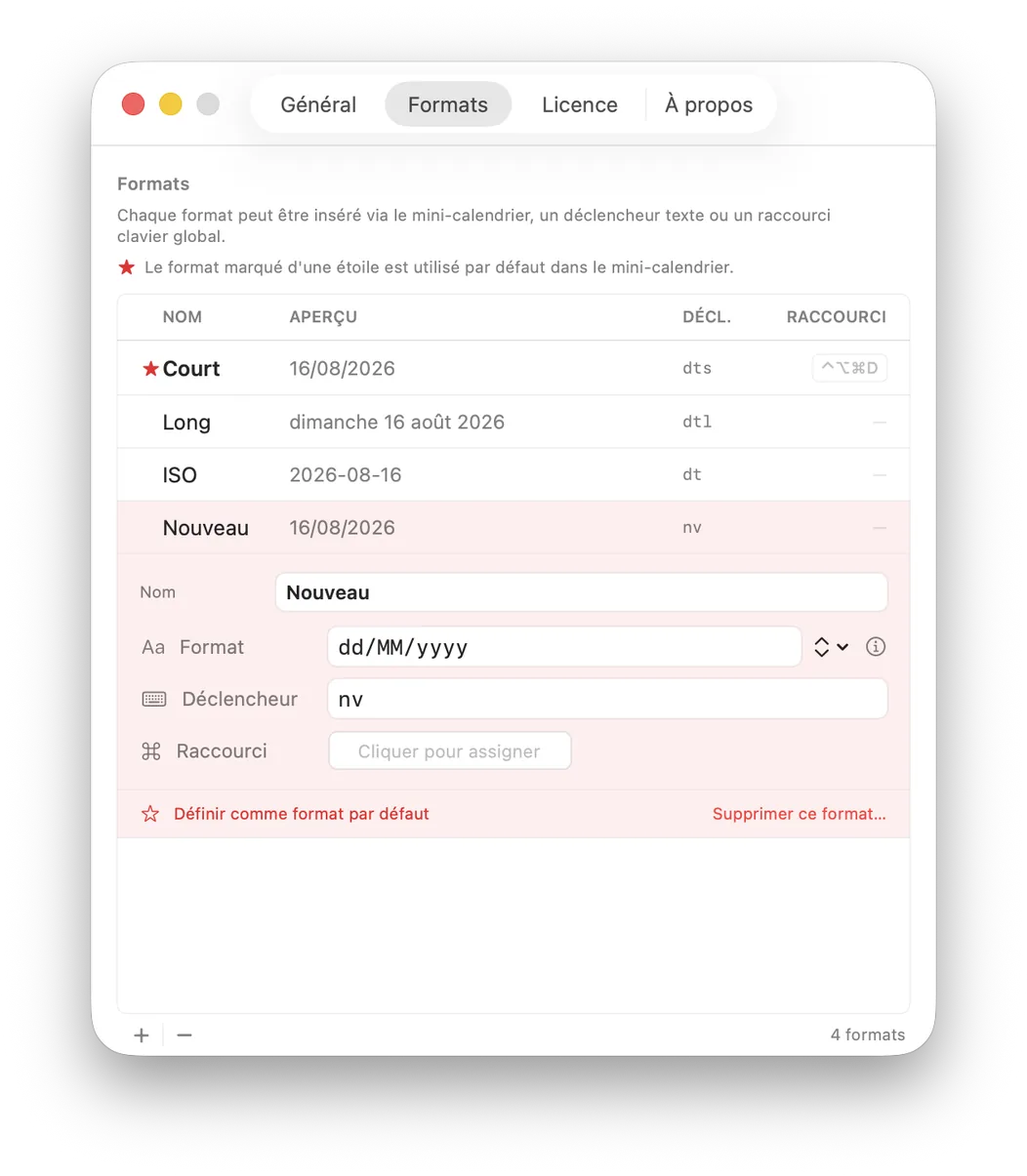
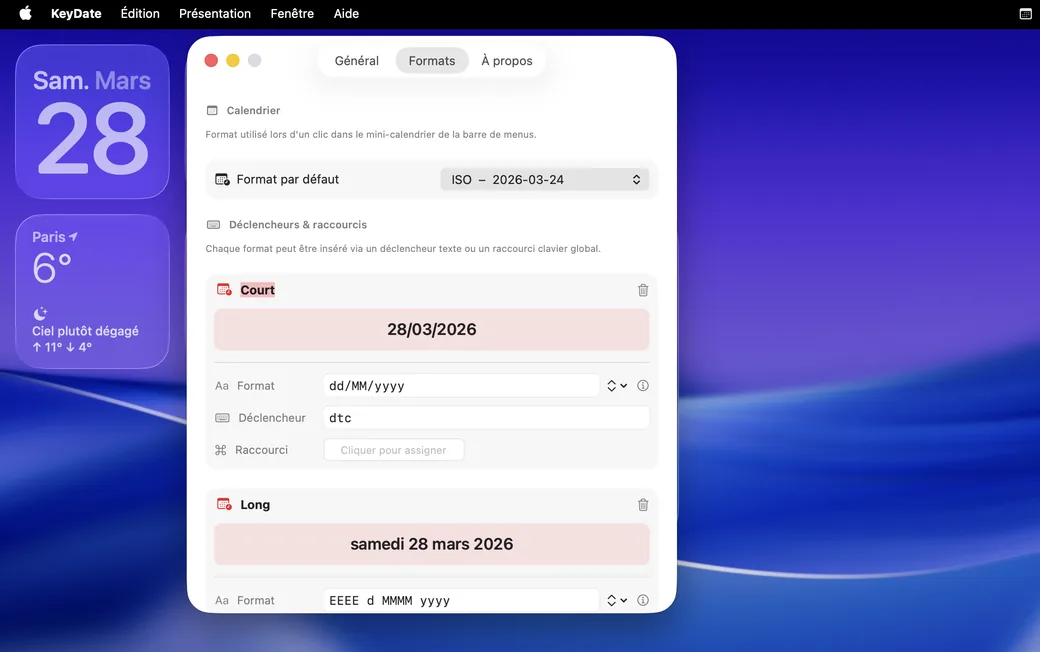
KeyDate Preferences, Formats tab: format list with triggers and shortcuts, format editor open
Unlimited formats — each with its own trigger and shortcut.
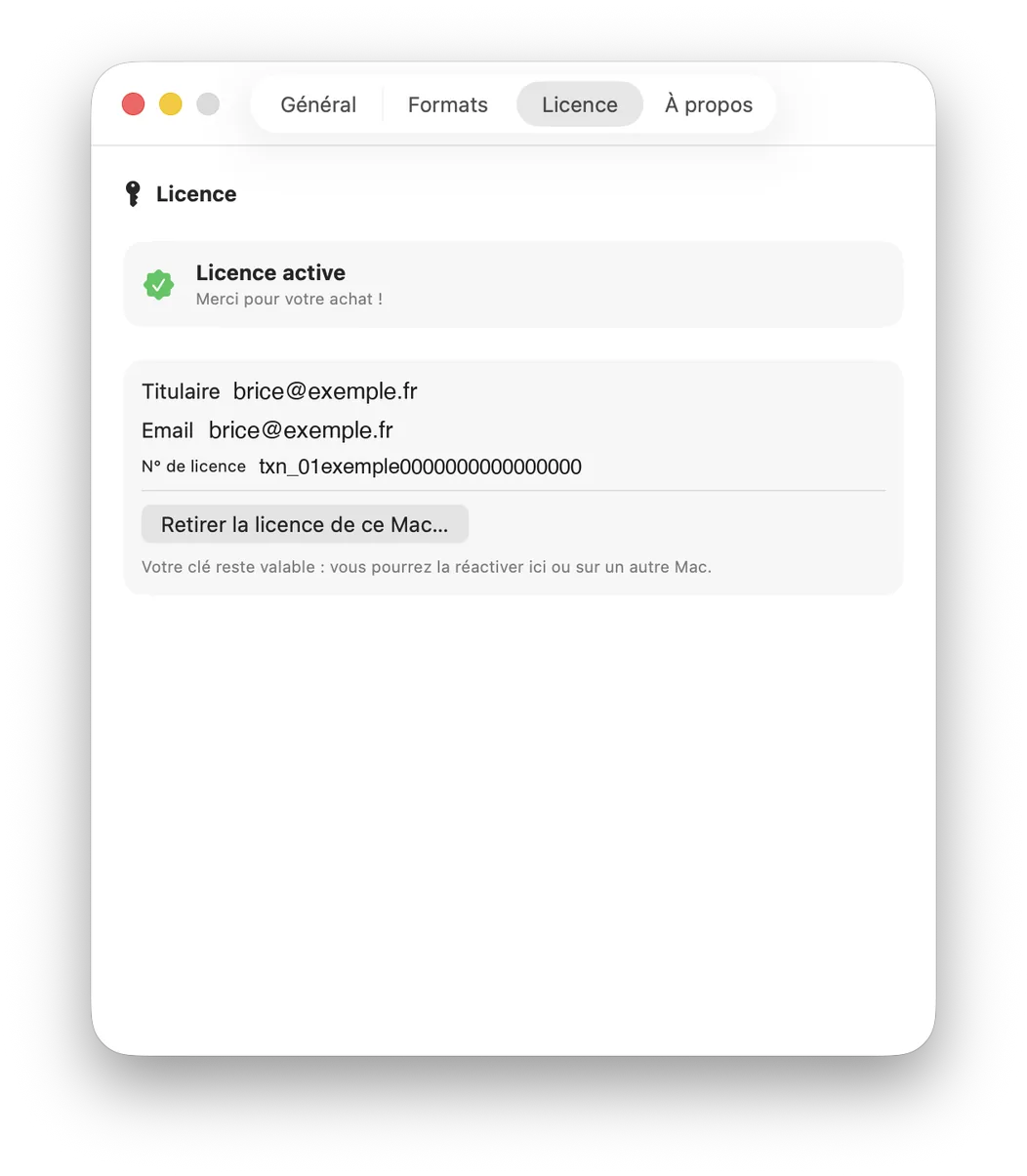
KeyDate Preferences, License tab: active license with holder, email and number, remove button
A simple license: offline activation, valid on all your Macs.

Everything you need. Nothing more.

A date is 3 keystrokes with KeyDate — instead of 12 by hand. Do the math over a week.

🗓

Your format, not the machine’s

Short, long, ISO 8601, or your own template. Every format is fully configurable on demand.

🌐

French / English bilingual

The interface and date formats automatically adapt to your macOS language setting.

🌓

System / Light / Dark appearance

KeyDate follows your Mac's theme, or you can pin it to the appearance of your choice.

Launch at login

Enable it once and KeyDate will always be ready from the moment your Mac starts up.

📅

Calendar always at hand

The menu bar mini calendar shows the days of the week, week numbers, and the current month — instant reference without opening any app.

🔒

Your keystrokes never leave your Mac

No data collected, no account, no tracking. The only network request is the update check.

🪶

Invisible until you need it

A menu bar app with no persistent window. Minimal memory footprint, zero performance impact.

Native macOS

Built with SwiftUI. No Electron, no third-party runtime. Just a real Mac app.

KeyDate Preferences window — Formats tab with dts, dtl triggers and keyboard shortcut

Born from a daily need.

"

In my work, I type today's date constantly — in my notes, at the top of my files. The YYYY-MM-DD format became second nature: files sort themselves into chronological order automatically, without any effort.

For years, the big text-expansion tools filled that role perfectly. But their power comes at a price — often a subscription — and for such a specific use, it was hard to justify the cost.

The idea came naturally: what if I built exactly the tool I need — nothing more? Not a Swiss Army knife. Just the date, instantly, in any application.

I also had another, quieter need: a quick glance at a mini calendar with week numbers, without opening an app. So I figured I'd combine both into one lightweight app, bought once.

KeyDate is the result: an app with no subscription, no fluff, that does exactly what it needs to. I hope you enjoy it!
One simple price. Once.

No subscription, no account, no surprises — a lifetime license for version 1.

🚀 Launch offer
€4.99 incl. tax
instead of €9.99 (regular price)
  • Lifetime license — one-time purchase
  • Free 14-day trial, no credit card
  • All 1.x updates included
  • Valid on all your Macs (personal license)
  • Refunded within 14 days if not convinced
  • Signed and notarized by Apple

Secure payment by Paddle (official reseller) — card, Apple Pay, PayPal.

KeyDate
Version 1.1

see what's new →

Try KeyDate for free.

Free 14-day trial, all features included.
No account, no credit card, no subscription.

↓  Download for macOS
Requires macOS 13.5 Ventura or later
Compatible with Apple Silicon (M1/M2/M3/M4) and Intel  ·  4.5 MB

🔑  Buy the lifetime license — €4.99

🚀 Launch offer: the lifetime license is €4.99 instead of the regular €9.99. Try free for 14 days, buy when you're convinced — buy now.

📦 Installed in 10 seconds

Open the downloaded file, then drag KeyDate into your Applications folder. That's it: the app is signed and notarized by Apple — macOS opens it without any security alert.

Everything people ask us.

Is the license really "lifetime"?

Yes. You pay once, the license never expires, and every version 1 update (1.1, 1.2…) is included. If a major version 2 ever ships, it will come with a discounted upgrade price — and your version 1 will keep working, forever.

On how many Macs can I use it?

On all your Macs. The license is personal: one key, one human, as many machines as you own. Activation is 100% offline — no server, no counter, no remote deactivation.

What if KeyDate isn't for me?

Two safety nets: the free 14-day trial (all features, no credit card) before buying, and a full refund within 14 days after buying, no questions asked — just email feedback@keydate.app. Details in our terms.

What do you do with my data?

Nothing — we don't have any. KeyDate collects no data, requires no account and works offline; its only network request is the update check. Your keystrokes never leave your Mac. Full privacy policy.

Will I get an invoice?

Yes, automatically. Sales are handled by Paddle, our official reseller: a proper invoice (tax included) lands in your inbox right after purchase — expense-report ready.